







Key Takeaways
- 1.Sales workflow automation is about controlling routing, enrichment, and handoffs across your GTM stack, not just automating tasks within your sales process.
- 2.Automation breaks at scale when data is inconsistent, systems are disconnected, and CRM logic can’t handle real routing complexity.
- 3.High-performing RevOps teams centralize workflow logic, enforce governance, and track impact through speed, accuracy, and revenue metrics.
- 4.Default replaces the Chili Piper + LeanData + Clearbit + Zapier Frankenstack with a single orchestration layer so routing, enrichment, and handoffs run consistently
Sales workflow automation doesn’t break because of bad tools. It breaks when your GTM motion outgrows your system.
At low volume, everything holds together. Then you scale. More regions, segments, systems, edge cases…
Routing becomes inconsistent, ownership gets blurred, and high-intent leads sit unworked.
The issues don’t always show up in your CRM, but they show up in missed SLAs and lost pipeline.
This guide breaks down how to design sales workflow automation that scales with your GTM, so routing stays accurate, response times stay fast, and revenue execution stays predictable.
Why sales workflow automation breaks at scale
Most workflow issues don’t show up when systems are simple—they show up right as you start scaling.
For many companies, that inflection point comes earlier than expected. Gartner estimated that high-growth teams often adopt a RevOps model between $5M–$20M ARR. That’s exactly the window when routing logic, ownership rules, and system dependencies start to compound—and when CRM-native automation stops being enough.
At that stage, workflows don’t fail outright, but they do start to become inconsistent.
That inconsistency shows up in a few predictable ways:
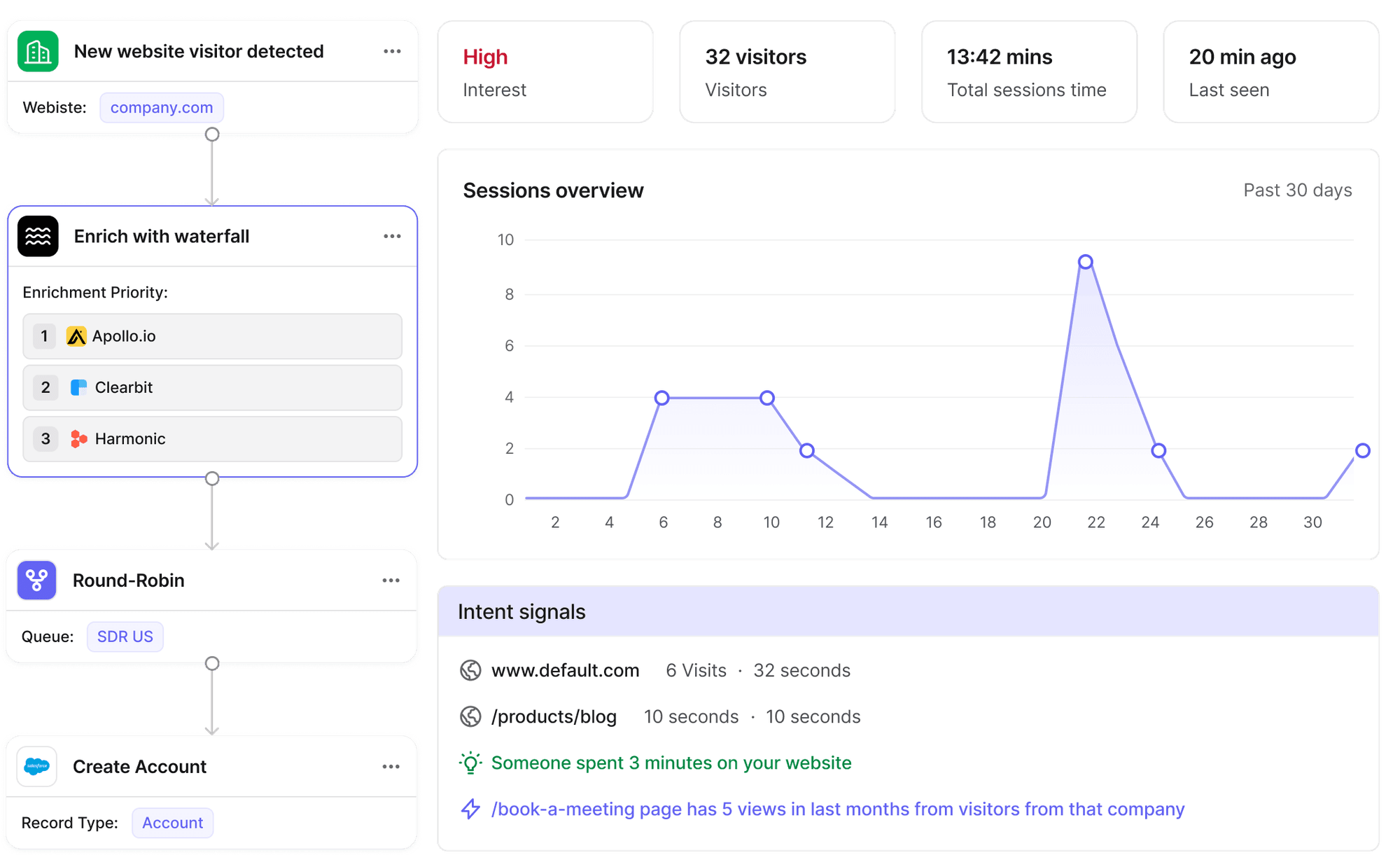
- Cross-system orchestration gaps: CRM, enrichment, routing, and engagement tools don’t sync in real time, causing delays and missed triggers
- Lead-to-account matching issues: misrouting and duplicate outreach fragment ownership
- Multi-region routing complexity: territory and capacity logic outgrow CRM limits
- SLA enforcement gaps: leads sit unworked without escalation
- Data inconsistencies: poor data breaks workflow logic
- CRM limitations: native workflows can’t handle real-time, cross-system execution
Individually, these issues are manageable. At scale, they compound, leading to routing errors, slower response times, and pipeline leakage that is difficult to trace back to a single cause.
Over time, this makes revenue execution harder to control, predict, and improve.
How sales workflow automation fits into the modern B2B GTM stack
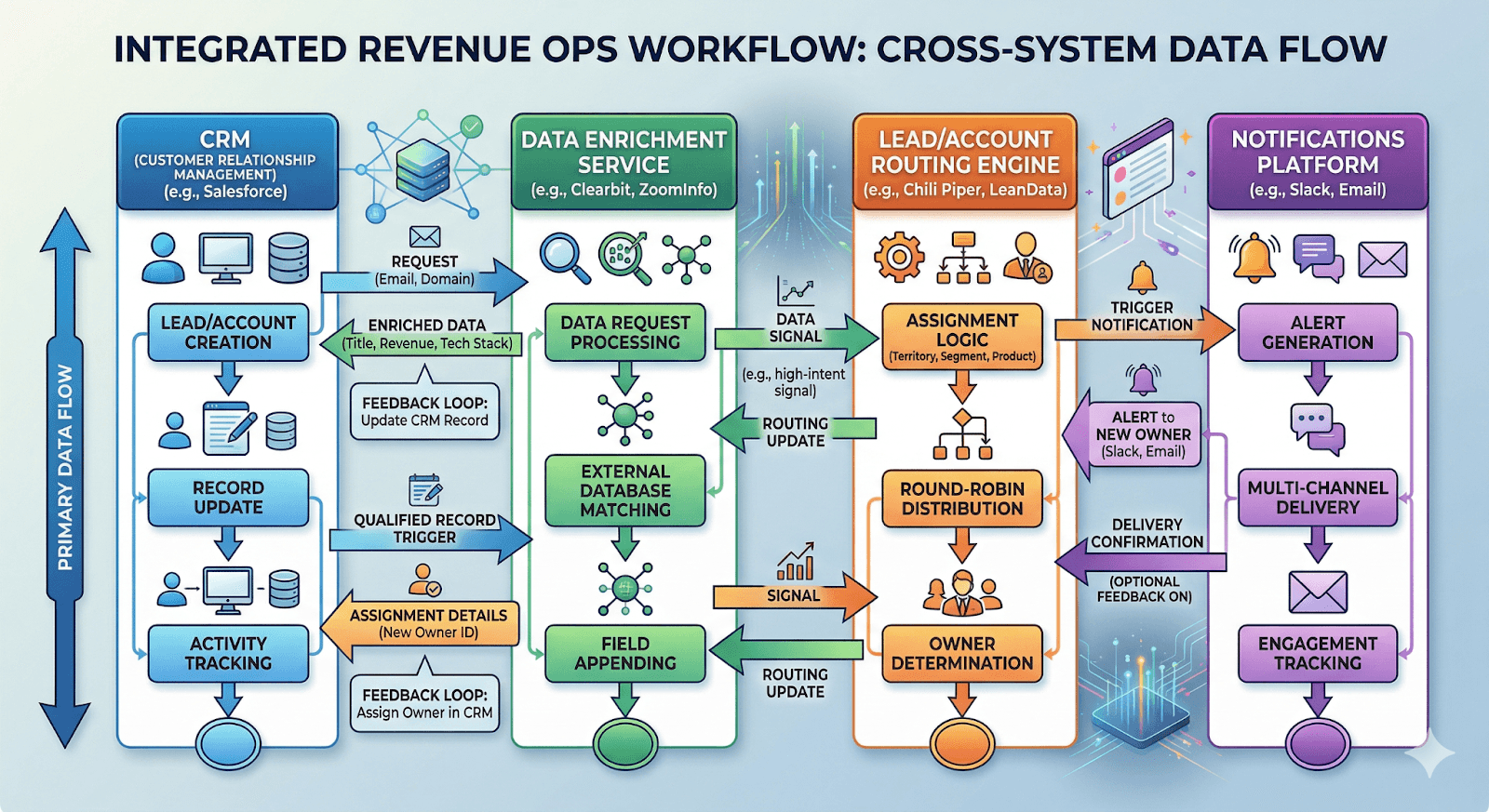
Sales workflow automation sits across your entire GTM stack, controlling how data, decisions, and actions move between systems. Without it, even strong sales automation tools operate in silos, leading to routing errors, delays, and lost revenue.
Core layers of the GTM workflow stack:
- Data and enrichment
Enrichment tools enhance customer data, including lead and account data, with firmographic and intent signals. This data drives routing, lead scoring, and prioritization.
- CRM (system of record)
CRMs store pipeline, ownership, and activity. But execution depends on clean data and external workflow logic. - Routing and orchestration
This layer defines ownership, territory rules, lead-to-account matching, and SLA enforcement. It determines what happens next. - Engagement and execution
Sales tools execute outreach based on workflow decisions but rely on upstream logic for timing and targeting. - Monitoring and feedback
Dashboards track routing accuracy, response time, and conversion, exposing workflow gaps.
High-performing teams centralize this logic into one system instead of spreading it across tools.
The limits of native CRM automation for marketing teams
Most teams start with CRM automation because it’s built-in and easy to deploy. And early on, it works.
But once your routing logic, SLAs, and systems start getting more complex, you run into the edges pretty quickly.
Limited cross-system orchestration
CRMs are systems of record, not execution engines.
They struggle to trigger and coordinate workflows across enrichment, routing, and engagement tools in real time leading to delayed routing, missed triggers, and inconsistent funnel execution.
Rigid workflow logic
Native automation lacks flexibility for complex branching, multi-condition routing, and account-level logic.
As GTM complexity increases, teams rely on workarounds that quietly erode routing accuracy.
No real-time SLA enforcement
CRMs don’t natively support real-time monitoring, escalation, or reassignment.
Leads sit unworked, SLAs slip, and speed-to-lead drops, directly impacting conversion rates.
5 steps to build sales automation that scales cleanly
Scaling sales workflow automation means building a system that can handle complexity across your sales process without breaking routing, SLAs, or data quality.
Step #1: Map your revenue logic before building automation
Most workflows fail because they reflect CRM structure, not how revenue actually flows. Start by defining:
- Lead-to-account matching, including edge cases
- Territory rules by region, segment, and account tier
- Routing priorities based on speed, ownership, or rep capacity
Step #2: Centralize workflow governance
When multiple teams build workflows independently, conflicts are inevitable. Overlapping logic leads to misrouting, duplicate actions, and broken SLAs.
To avoid this:
- Assign ownership of workflows to RevOps
- Standardize naming, versioning, and documentation
- Limit ad-hoc automation inside CRM tools
Governance ensures workflows don’t compete or override each other as complexity grows.
Step #3: Design for cross-system orchestration
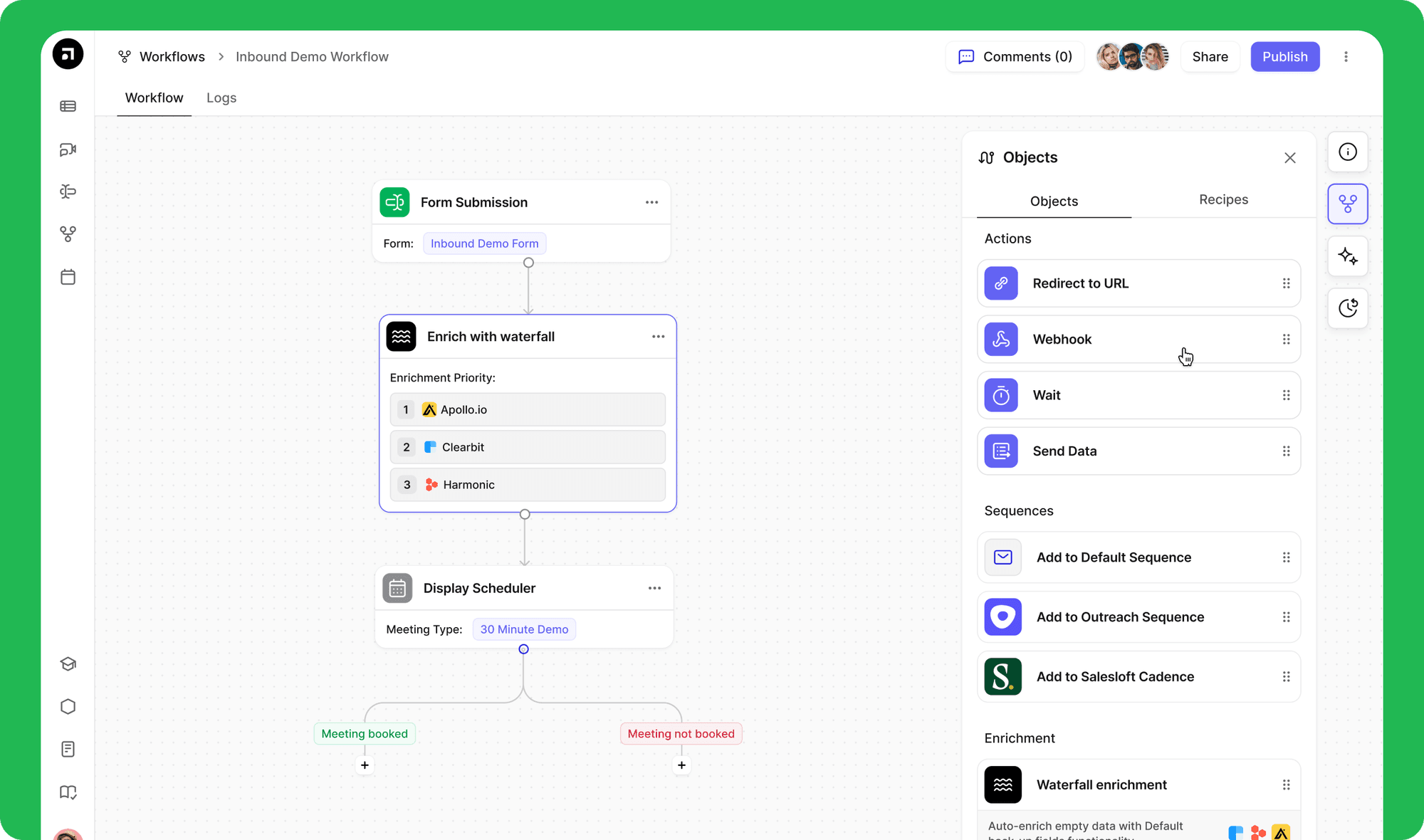
Sales workflows span multiple systems, not just your CRM. These include enrichment tools, routing logic, engagement platforms, and customer success systems.
Your automation should:
- Trigger actions across systems in real time
- Sync updates instantly instead of relying on batch processes
- Maintain a single source of truth for ownership and status
This reduces delays, prevents data mismatches, and ensures every system operates on the same logic.
Step #4: Enforce SLA and routing accuracy
Automation without enforcement creates blind spots. Leads can still sit unworked or be routed incorrectly without visibility.
To maintain performance:
- Track lead response time across segments and regions
- Automatically reassign or escalate unworked leads
- Monitor routing accuracy across all workflows
Key metrics to track:
- Lead response time
- Routing accuracy
- Manual touch reduction
- SLA adherence
- Revenue impact (conversion rates, pipeline velocity)
Step #5: Measure and optimize automation impact
Automation should be continuously improved, not set once and left unchanged. Without measurement, workflow issues remain hidden.
Evaluate regularly:
- Where routing errors occur
- Where SLAs are missed
- Where manual intervention is still required
Then:
- Refine routing logic
- Remove unnecessary steps
- Improve data inputs
The goal is predictable execution that scales with your pipeline.
To put this into practice, you need a system that can actually execute this logic across tools in real time, without breaking as complexity grows.
See how Default centralizes routing, SLA enforcement, and cross-system orchestration in one place. Explore the platform.
How workflow automation benefits B2B sales execution
When routing is precise, SLAs are enforced, and data flows cleanly between systems, everything moves faster.
Deals progress with less friction, follow-ups happen on time, and ownership is clear across the entire sales process from first touch to close.
Faster speed-to-lead and higher conversion rates
- Reduce response times from hours to minutes through automated routing and instant assignment
- Ensure leads are acted on while intent is still high
- Increase the likelihood of engagement and conversion by responding faster
Improved routing accuracy and ownership clarity
- Assign leads and accounts based on territory, segment, and rep capacity
- Eliminate misrouting and duplicate outreach
- Ensure consistent ownership across the entire pipeline
Reduced manual work and operational overhead
- Automate enrichment, assignment, and follow-ups
- Remove repetitive admin tasks across RevOps and sales
- Allow teams to focus on lead generation and deal progression instead of fixing data and routing issues
Stronger SLA adherence and accountability
- Ensure leads are worked within defined timeframes through built-in monitoring and escalation
- Automatically reassign or escalate unworked leads
- Prevent pipeline leakage caused by delays or missed follow-ups
- Maintain consistent execution across teams and regions
Better visibility into revenue execution
- Gain clear insight into routing accuracy, response times, and conversion performance
- Identify workflow failures quickly across the funnel
- Use real-time data to optimize routing, SLAs, and execution
- Improve decision-making based on measurable performance, not assumptions
Examples of workflow automation in sales
High-performing RevOps teams focus on workflows that directly impact speed, accuracy, and revenue execution.
- Inbound lead routing and qualification
Automatically enrich, score, and route inbound leads based on territory, segment, and intent signals. High-value leads are assigned instantly and worked within SLA, improving speed-to-lead and conversion rates. - Lead-to-account matching and ownership
Match new leads to existing accounts in real time and assign them to the correct owner. This prevents duplicate outreach and keeps ownership consistent across the pipeline. - SLA-based follow-up and escalation
Trigger alerts or reassign leads when SLAs are missed. This ensures timely follow-up and prevents high-intent opportunities from going cold. - Outbound trigger-based workflows
Enroll accounts into outbound sequences based on signals like demo requests or pricing page visits, improving timing and engagement. - Sales-to-customer success handoff
Automatically transfer ownership and context after close, reducing onboarding friction and ensuring continuity.
These are the workflows that determine whether leads move forward or stall. When they’re automated properly, execution stays consistent even as volume increases.
Choosing the right sales workflow automation platform for RevOps
The platform you choose for RevOps determines whether your workflows stay aligned (or slowly drift out of control).
Cross-system orchestration
RevOps workflows don’t live in one tool. They span CRM, enrichment, routing, and engagement platforms.
Without orchestration, execution breaks:
- delays in routing
- data mismatches
- missed triggers
Default centralizes workflow logic, ensuring real-time coordination across systems without relying on fragile integrations.
Advanced routing and logic
Basic automation can’t handle lead-to-account matching, multi-region routing, or capacity-based assignment.
As complexity grows, routing becomes inconsistent and harder to maintain.
Default enables flexible, event-driven automated workflows that reflect real GTM conditions—ensuring accurate routing and ownership at scale.
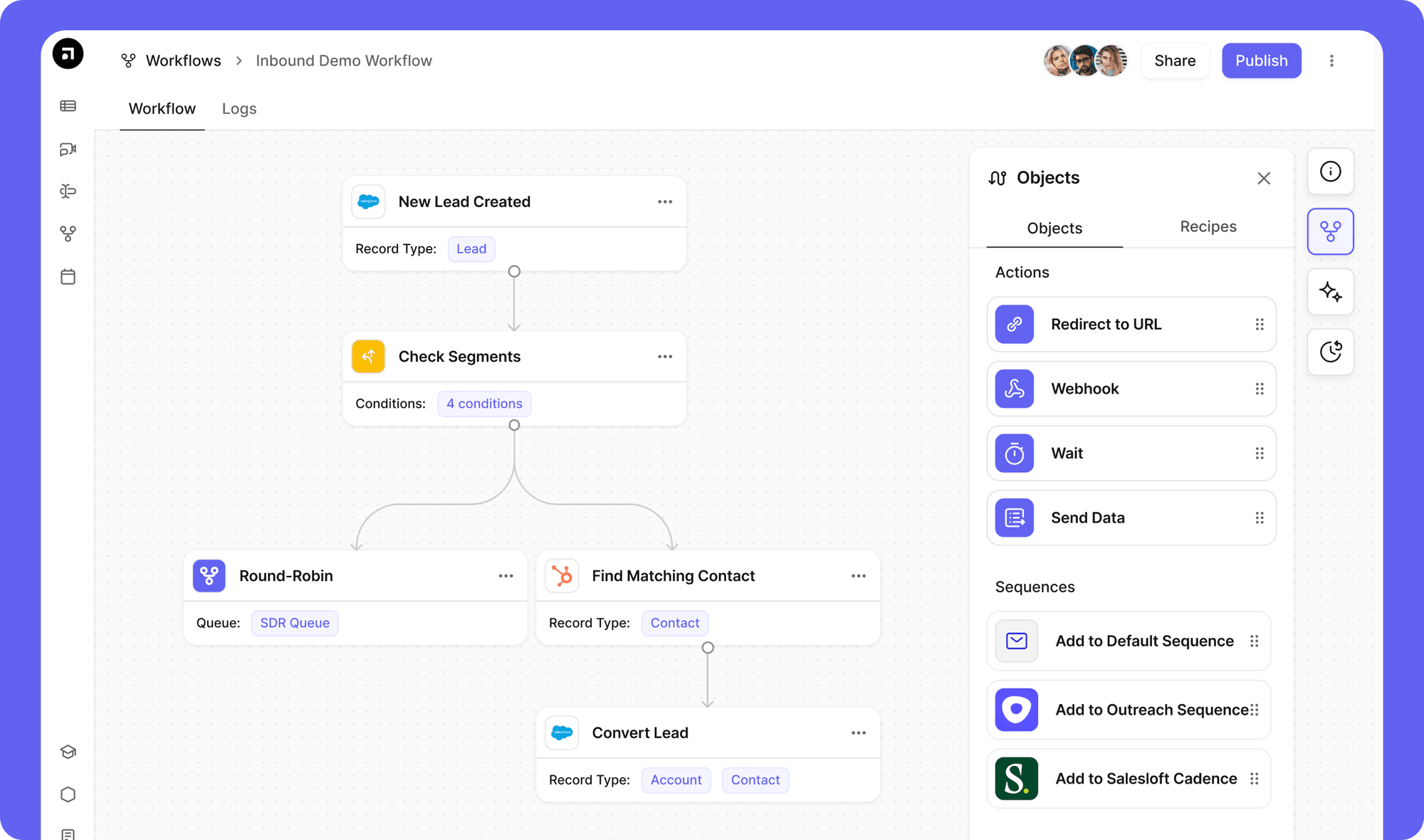
Real-time monitoring and SLA enforcement
Without visibility, workflows fail silently, leading to missed SLAs and lost pipeline.
Default provides real-time monitoring, alerts, and built-in escalation workflows that automatically reassign or flag unworked leads.
The goal isn’t more automation; it’s consistent execution. No matter how complex your GTM becomes.
If your workflows start to drift as complexity increases, it’s a sign your system isn’t built for scale. See how RevOps automation platform from Default helps you maintain consistent execution across routing, SLAs, and data flows as your GTM grows.
Quick checklist for RevOps leaders & sales teams
Use this checklist to evaluate whether your sales workflow automation is improving routing accuracy, speed-to-lead, and revenue execution:
RevOps Workflow Optimization Checklist
0 / 8See how Default automates sales workflows
Routing errors, missed SLAs, and ownership issues don’t look like big problems individually, but they quietly reduce conversion across your funnel.
Default gives you control over how those workflows run, so execution stays consistent as you scale.
Book a demo and see what your pipeline looks like when nothing slips through.
FAQs
- What is sales workflow automation?
Sales workflow automation is the orchestration of routing, enrichment, and follow-ups to improve speed, accuracy, and SLA compliance across your GTM stack.
- Why does sales workflow automation fail at scale?
Because CRM-native workflows can’t handle cross-system orchestration, complex routing, or real-time SLAs, leading to delays and misrouting.
- What should RevOps teams automate first?
Start with inbound routing, lead-to-account matching, and SLA enforcement—these directly impact speed-to-lead and conversion.
- How do you measure success?
Track routing accuracy, response time, SLA adherence, manual work reduction, and conversion rates.
- Do you need a dedicated platform?
Yes. CRM automation is limited. Scalable workflows require real-time orchestration across systems without manual workarounds.