








Key Takeaways
- 1.HubSpot Sequences support rep-led outreach with automated emails and task reminders, and they automatically stop when a contact replies or books.
- 2.HubSpot Workflows run trigger-based automation across contacts, companies, deals, and tickets to enforce routing, lifecycle updates, and process consistency.
- 3.Use Sequences for structured 1:1 follow-ups. Use Workflows for scalable automation and governance.
- 4.In mature GTM systems, Workflows set the rules; Sequences execute outreach within them.
Choosing between HubSpot Sequences vs Workflows is simpler than it looks. Sequences support rep-led outreach. Workflows automate routing, lifecycle updates, and system logic. When teams blur the line, routing breaks, follow-ups overlap, and reporting becomes unreliable.
Here’s what you need to know:
- What Sequences are built for
- What Workflows actually automate
- Where teams misuse each tool
- How to combine both without creating automation conflicts
This guide gives you a clear, operational answer so your HubSpot setup scales without friction.
Quick verdict: HubSpot Sequences vs Workflows
Use HubSpot Sequences for structured, rep-led outreach such as 1:1 follow-ups and outbound cadences. They combine automated email steps with task reminders and stop when a contact engages.
Use HubSpot Workflows for trigger-based automation, including lead routing, lifecycle updates, and multi-step logic. In mature setups, Workflows manage system rules while Sequences handle controlled sales outreach within those rules.
What are HubSpot Sequences?
HubSpot Sequences are sales outreach tools designed for rep-led follow-up. They combine automated emails with task reminders to help SDRs and AEs run consistent 1:1 cadences.
They’re ideal for outbound prospecting and post-demo follow-ups. They don’t handle routing, lifecycle updates, or broader CRM automation.
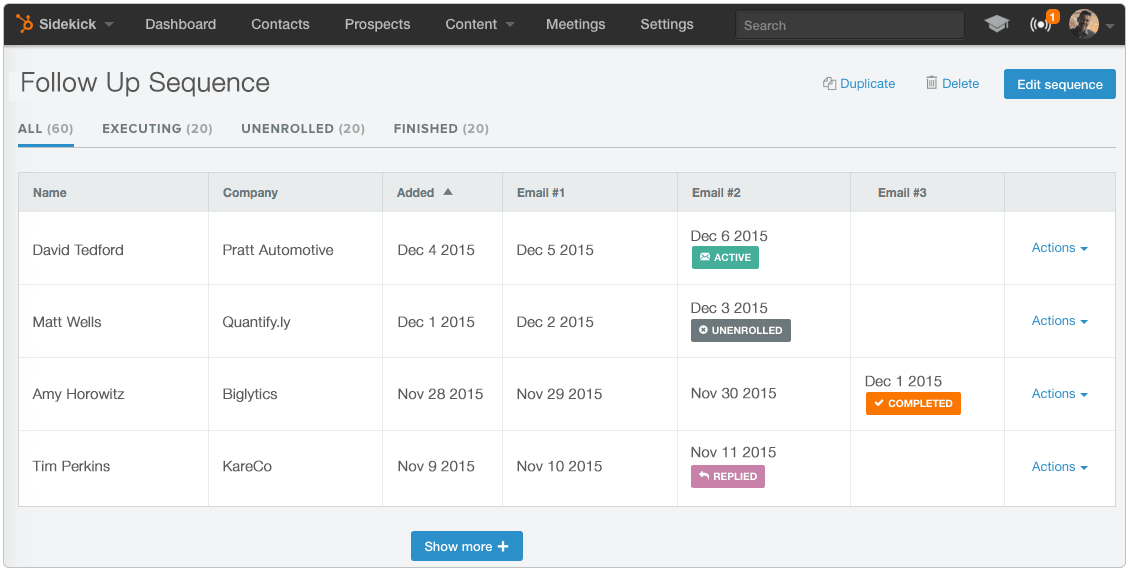
How HubSpot Sequences work
HubSpot Sequences are designed for structured sales outreach. They help reps run consistent follow-up without fully automating the sales conversation.
Once a rep enrolls a contact, the sequence follows a linear cadence:
- An automated email sends from the rep’s connected inbox.
- A timed delay applies (for example, several business days).
- A task is created for the rep, such as a call or manual follow-up.
- Additional emails and tasks run according to the preset schedule.
If the contact replies or books a meeting, HubSpot automatically unenrolls them. Sequences don’t support branching logic, routing control, or cross-object automation.
What are HubSpot Workflows?
HubSpot Workflows are HubSpot’s automation engine. They run trigger-based actions across contacts, companies, deals, tickets, and custom objects without rep involvement.
Workflows manage routing, lifecycle updates, ownership changes, and data consistency. Once enrollment criteria are met, actions execute automatically, enforcing system-level process control as volume scales.
How HubSpot Workflows work
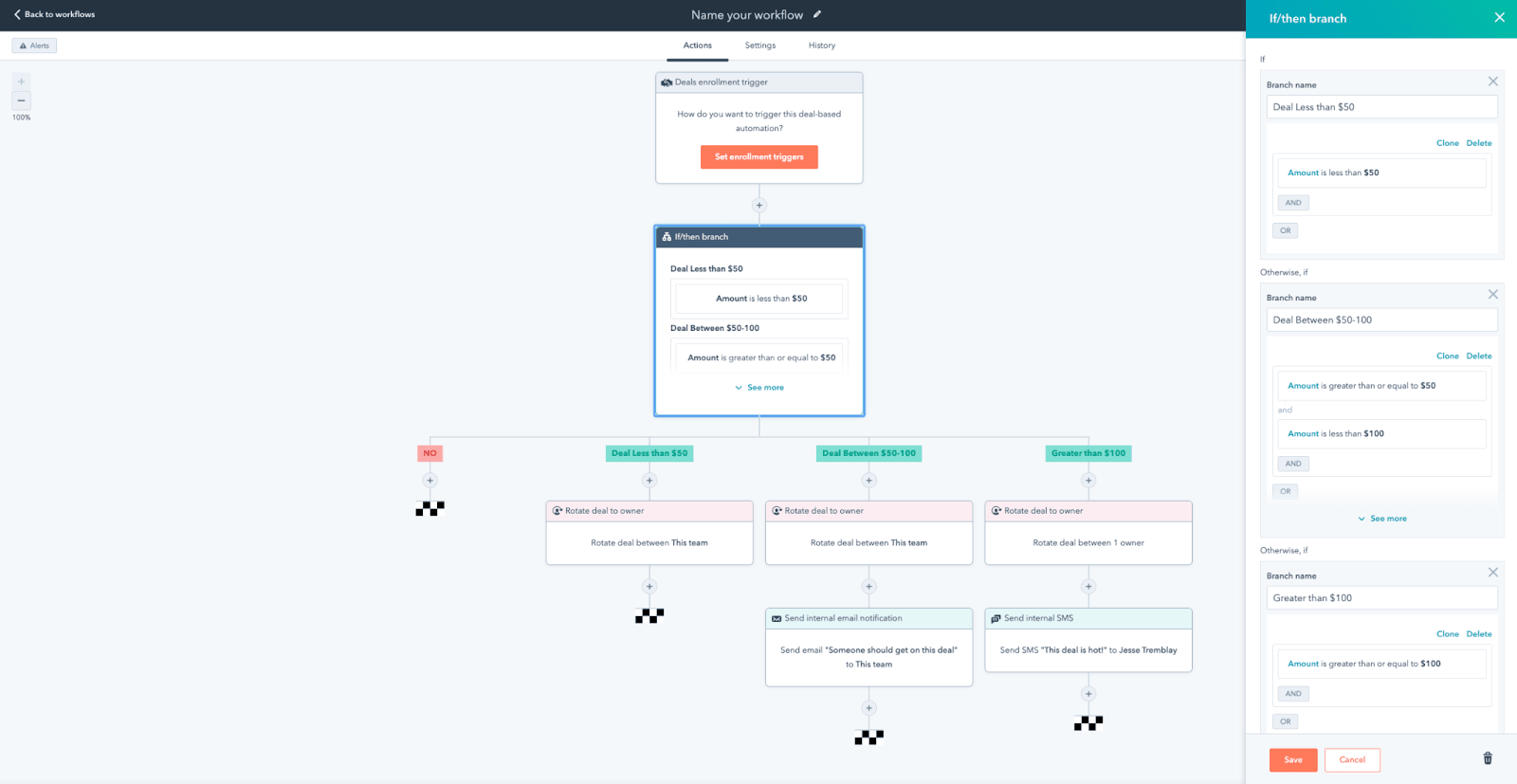
HubSpot Workflows are HubSpot’s automation engine. They run on defined triggers and conditions, enrolling records automatically when criteria are met.
A typical workflow lifecycle looks like:
- A trigger fires (for example, a form submission or property change).
- A contact, company, deal, or ticket enrolls automatically.
- Actions execute, such as updating properties, assigning owners, or sending notifications.
- If/then branches split records based on conditions.
- Delays and re-enrollment rules control timing and repetition.
Workflows operate across multiple object types and support layered automation depth. Advanced capabilities depend on your HubSpot subscription tier.
HubSpot Sequences vs Workflows: key differences
Here’s the practical comparison for GTM system design:
Which one should you use?
The right choice depends on the operational problem you’re solving. Sequences support rep execution. Workflows support system automation. Most teams need both, but for different reasons.
When to use HubSpot Sequences
Use Sequences when the goal is structured, rep-led outreach within a defined sales motion.
- Running outbound SDR cadences
- Following up after demos or trials
- Re-engaging stalled opportunities
- Enforcing SLA-based follow-up timing
- Managing 1:1 prospect communication from rep inboxes
Sequences help sales teams stay consistent without removing human control.
When to use HubSpot Workflows
Use Workflows when the goal is process enforcement across your CRM.
- Automating lead routing (round-robin or territory-based)
- Updating lifecycle stages based on qualification signals
- Reassigning ownership as deals progress
- Coordinating updates between contacts, companies, and deals
- Standardizing properties and maintaining data integrity
Workflows ensure your GTM system runs consistently as volume scales.
You can also explore how HubSpot's AI layer fits into this picture in our HubSpot Breeze AI review.
Bring your HubSpot automation together into one system with Default
HubSpot’s tools are powerful, but they often run in separate layers. Sequences manage outreach. Workflows handle automation. Enrichment, routing, and deduplication live elsewhere. Over time, that fragmentation leads to ownership conflicts, lifecycle drift, duplicate records, and reporting you can’t trust.
Default unifies routing, enrichment, deduplication, and lifecycle enforcement into one coordinated RevOps automation layer.
Instead of managing logic across overlapping workflows and disconnected tools, you get one system governing how your CRM operates.
If you want cleaner data, accurate routing, and predictable pipeline execution, book a demo to see how Default centralizes your HubSpot automation.